
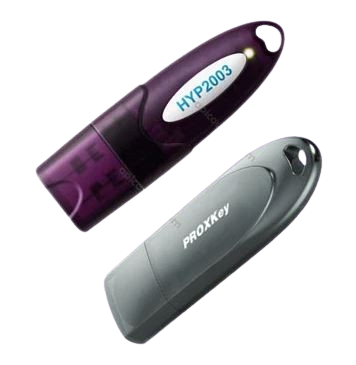
The National Single Window System (NSWS) is a revolutionary platform launched by the Government of India to simplify and fast-track business approvals. It integrates approvals from 32 Central Departments and 25 State Governments, allowing businesses to apply, track, and receive permissions through a single window.
To use the NSWS portal smoothly, a Digital Signature Certificate (DSC) is mandatory. This guide explains everything about the Digital Signature for NSWS, its importance, step-by-step registration process, and where to get a trusted DSC for NSWS registration.
⭐ What Is NSWS? (National Single Window System)
The NSWS Portal helps businesses identify, apply, and track approvals without visiting multiple government websites. It increases transparency and reduces processing time.
Key Functions of NSWS:
-
Identify all approvals required for your business through the KYA (Know Your Approvals) Module
-
Apply for approvals through a single unified portal
-
Track real-time status of applications
-
Upload documents securely
-
Get AI-based guidance for faster approvals
-
Avoid visiting multiple government departments
🌟 Benefits of Using NSWS Portal
-
✔ Centralized approval system
-
✔ Real-time status tracking
-
✔ Secure digital document submissions
-
✔ Faster turnaround time
-
✔ Easy renewals and updates
-
✔ AI-powered guidance for required approvals
🔐 Why Is Digital Signature for NSWS Mandatory?
A Digital Signature Certificate (DSC) is essential for completing procedures on NSWS. It is used for secure authentication, login, document signing, and maintaining legal validity.
Importance of DSC for NSWS:
-
✔ Highly secure login and verification
-
✔ Legally valid signing of applications
-
✔ Prevents identity fraud and manipulation
-
✔ Speeds up approval workflows
-
✔ Ensures authenticity of submitted documents
How to Register Digital Signature for NSWS
Follow these steps to register your Digital Signature Certificate (DSC) on NSWS:
Step 1: Ensure Prerequisites
✅ Install emBridge Utility for DSC authentication.
✅ Ensure your PAN is linked to the NSWS portal.
✅ Use a CCA-approved DSC provider.
- PAN details filled in the Common Registration Form (CRF) will be auto-filled in the DSC section.

- Users can add the DSC of the authorized signatory by clicking on the ‘Add’ option.
- If emBridge software is not installed, an error message will be displayed.
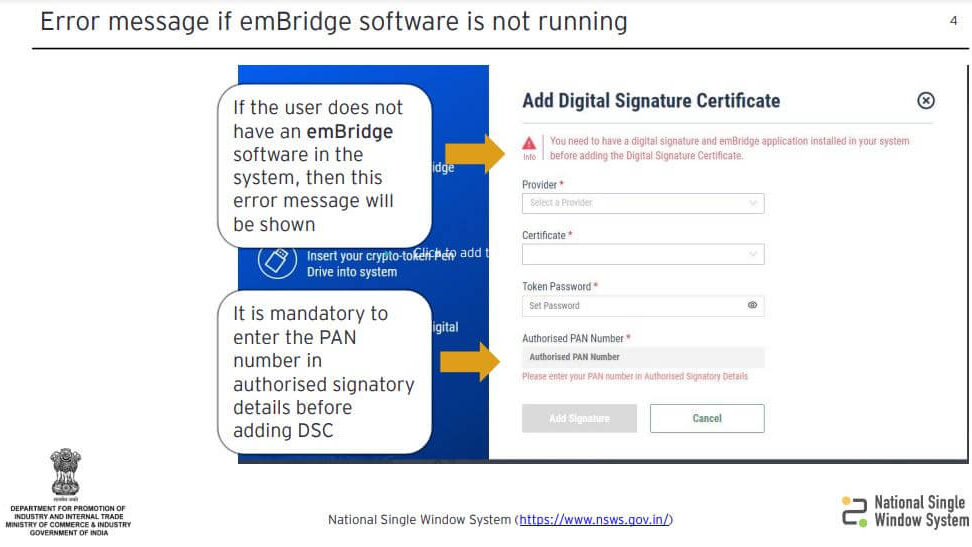
- PAN number entry is mandatory before adding DSC.
- Select the desired provider from the dropdown and choose the certificate from the list.
- Enter the token password associated with the DSC.

- After filling all required information, click on the ‘Add Signature’ tab.
- A pop-up message confirms successful registration of DSC with the PAN number

NSWS Digital Signature Registration
Where to Get a Trusted Digital Signature for NSWS?
Always opt for a CCA-approved Digital Signature provider to avoid errors on the NSWS portal.
Choose a DSC provider that offers:
-
✔ Quick issuance
-
✔ 100% NSWS compatibility
-
✔ Legal validity
-
✔ Strong encryption standards
-
✔ Easy renewal & support
📩 Email: info@apiinfotech.com
📞 Call/WhatsApp: 9784417276
(API Infotech – Trusted DSC Provider)
❓ FAQs: Digital Signature for NSWS
1. Is a Digital Signature required for NSWS registration?
Yes, DSC is mandatory for authentication and filing on the NSWS portal.
2. Can the same DSC be used for multiple approvals?
Yes. One DSC works for all approvals under your NSWS account.
3. What if emBridge Utility is not installed?
The portal will not detect your DSC. Install emBridge before proceeding.
4. Can one DSC be linked to multiple PAN numbers?
No. A DSC is mapped to a single PAN only.
5. Which Class of DSC is needed for NSWS?
A Class 3 DSC is required for NSWS authentication and document signing.
🚀 Conclusion
A Digital Signature for NSWS is essential for a smooth, secure, and paperless approval process on the National Single Window System. By using a trusted and CCA-approved DSC, businesses can speed up approvals and ensure full compliance.
📩 info@apiinfotech.com
📞 9784417276
👉 Get Your Verified NSWS DSC Today!